FastForward Pro

An ergonomic mouse with silent click, productivity button and tiltable hyperscroll wheel that allows you to scroll vertically and horizontally.

FastForward Pro
Working with a traditional mouse is like a workout without results. You scroll yourself silly, your wrist twists inwards, your fingers do all the hard work, and you wonder why coffee number 3 isn't helping anymore. All these problems are now a thing of the past.

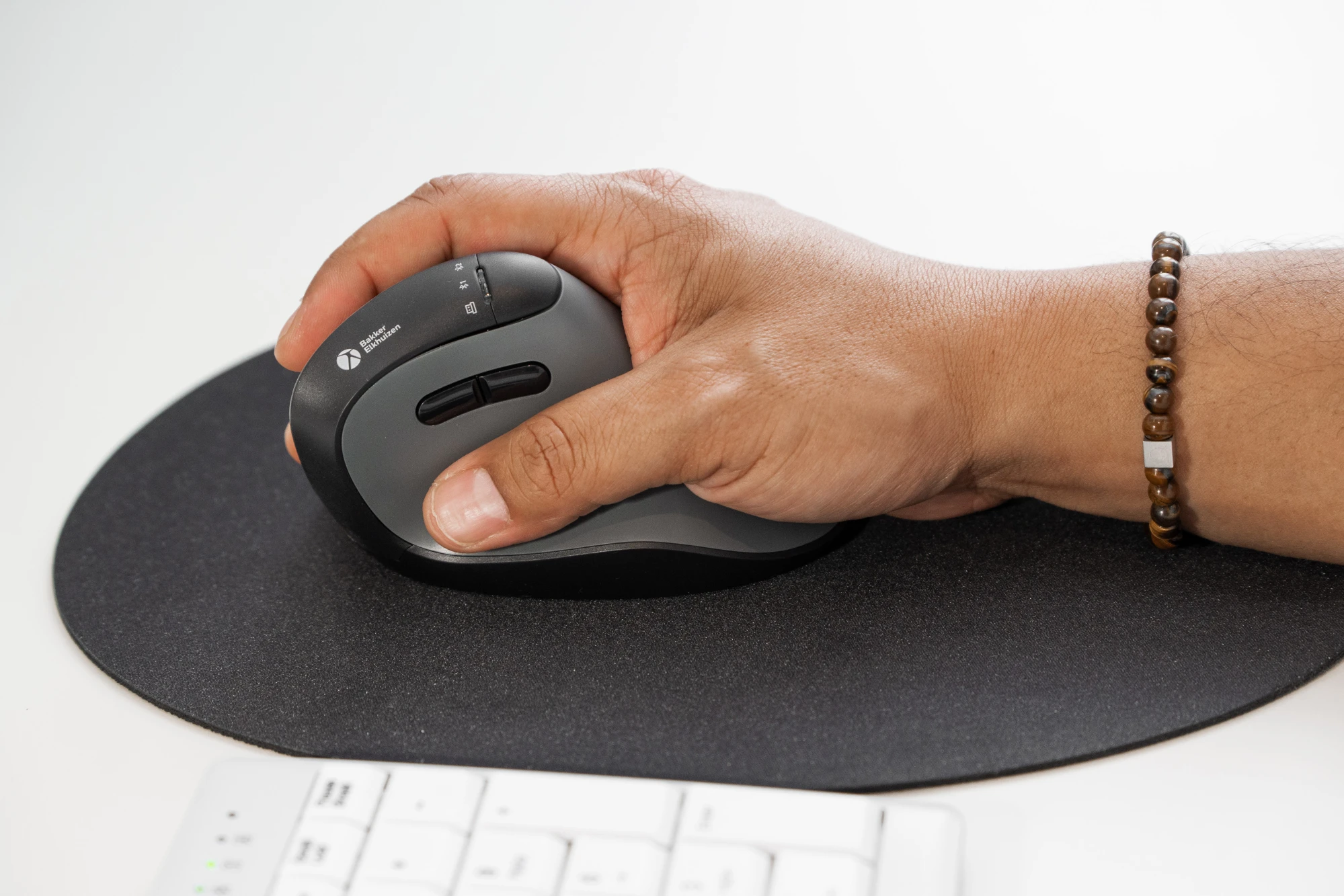
FastForward Pro is designed for those who have no time to waste. Fly through documents with hyperscroll, switch easily between windows with the productivity button and now also scroll horizontally with the tiltable scroll wheel. This gives you all the tools you need to work quieter, faster and smarter. Like its little brother, the FastForward Pro is designed for long-term use without discomfort. The shape follows the natural position of your hand and wrist, relieving strain on muscles and joints. The silent click ensures you can work with concentration, even in shared workspaces.

A design that exudes professionalism

The playful look of the original model has been replaced by a variant with our dark grey concept, which gives it an exclusive look. The FastForward Pro combines subtle elegance with ergonomic design, making it a perfect fit for any professional working environment. It is sleek, modern and ergonomically sound.
 
bakkerelkhuizen
Smart features
āœ”ļø Tiltable hyperscroll: fly through long documents, horizontally and vertically
āœ”ļø Productivity button: direct access to all your open screens
āœ”ļø Device switch button: now on top, making it even easier to switch between devices
āœ”ļø Silent click: work with concentration without distracting noises
 

Work super-fast with Hyperscroll

Anyone who regularly works with long documents or web pages knows the frustration of endless scrolling. The hyperscroll function in the FastForward Pro solves this problem: with a single turn of the wheel, you can fly smoothly through hundreds of lines of text or countless rows in Excel. Exactly the speed you need to stay focused. Try giving it away after a week.

The Productivity Button: your shortcut to efficiency

Now you can switch between all your windows super-fast with the productivity button. This mouse says, ‘Let me do the hard work.’ Working faster isn't just about high DPI, it's also about efficiency. From now on, you'll never have to search for tabs again. Where a traditional mouse makes windows play hide and seek, FastForward Pro gives you an instant overview.

Horizontal scrolling with the tilt wheel

Is your Excel sheet wider than your screen, but your mouse only scrolls up and down? Then you're in for a long session. Not anymore! No more awkward scrolling and zooming: wide spreadsheets, creative timelines or complex dashboards require more than just vertical navigation.
Thanks to the tiltable scroll wheel, you can now move left and right as well as up and down. A small push with your finger, and you have an instant overview!

Easier switching between devices

Do you work with multiple devices? The FastForward Pro makes it easy to switch between your laptop, tablet or smartphone. The device switch button has been moved to the top of the mouse, so you can switch effortlessly with a simple push of a button.

Why choose FastForward Pro?

āœ”ļø Ergonomic vertical design that prevents strain
āœ”ļø Whisper-quiet and lightning-fast in daily use
āœ”ļø Smart features for increased productivity
āœ”ļø Compatible with Windows, Mac, iPad, Android, Linux and Chrome OS
āœ”ļø 3 connection options: Bluetooth, wired and wireless with dongle
āœ”ļø Long battery life: up to four months on a single charge
āœ”ļø Plug & play - no drivers required

Ergonomic background

FastForward Pro tilts your hand at a 75° angle, automatically putting you in a neutral, relaxed working position. This position reduces strain on your hand, wrist and forearm, supports a healthy working posture and reduces the risk of complaints such as RSI and carpal tunnel syndrome. It feels natural right away, without a long adjustment period. Scientific literature shows that a more vertical hand position is associated with lower muscle tension (Aarås et al., 2001; Quemelo & Vieira, 2013). Because your wrist remains straight and the click action requires less resistance, your fingers need to exert less force. In addition, the productivity button eliminates many repetitive movements and, with an adjustable DPI, you can use coarser or finer motor skills depending on your work needs. This contributes to an ergonomic way of working.

Choose version

Choose amount

{{ $root.formatPrice(priceToShow, selectedVariant?.price_currency) }} excl. VAT
{{ $root.formatPrice(priceToShowIncl, selectedVariant?.price_currency) }} incl. VAT
Find a reseller
project

Ordering on a project basis?
Contact us for more options

Frequently Asked Questions

Didn't find what you are looking for, contact us

Contact our product experts

Are you looking for advice, or do have a question about our products. Contact our product experts.

headphones

Need help? We're here for you

Look at our FAQ or contact us

thumb

Our knowledge & products are the heroes

See our wide range of knowledge and products.

star

Many customers preceded you

Read about their experience with BakkerElkhuizen

Copyright © 2026 BakkerElkhuizen

Privacy policy Terms & conditions Cookie policy

We want to give you the best experience possible, have we selected the right country and language for you?
nl
United States
English
 
Continue >
Oceania
AU
Australia
North America
US
United States
Other
OT
Other (Global)